
Table of Contents
For nearly two years, mobile photographers and digital strategists globally had written off Snapseed as a forgotten relic of Google’s extensive app graveyard. While competitors like Adobe Lightroom and trend-focused editing suites continuously updated their platforms, Snapseed languished on Android without a major architectural refresh. That historical neglect officially ended in May 2026.
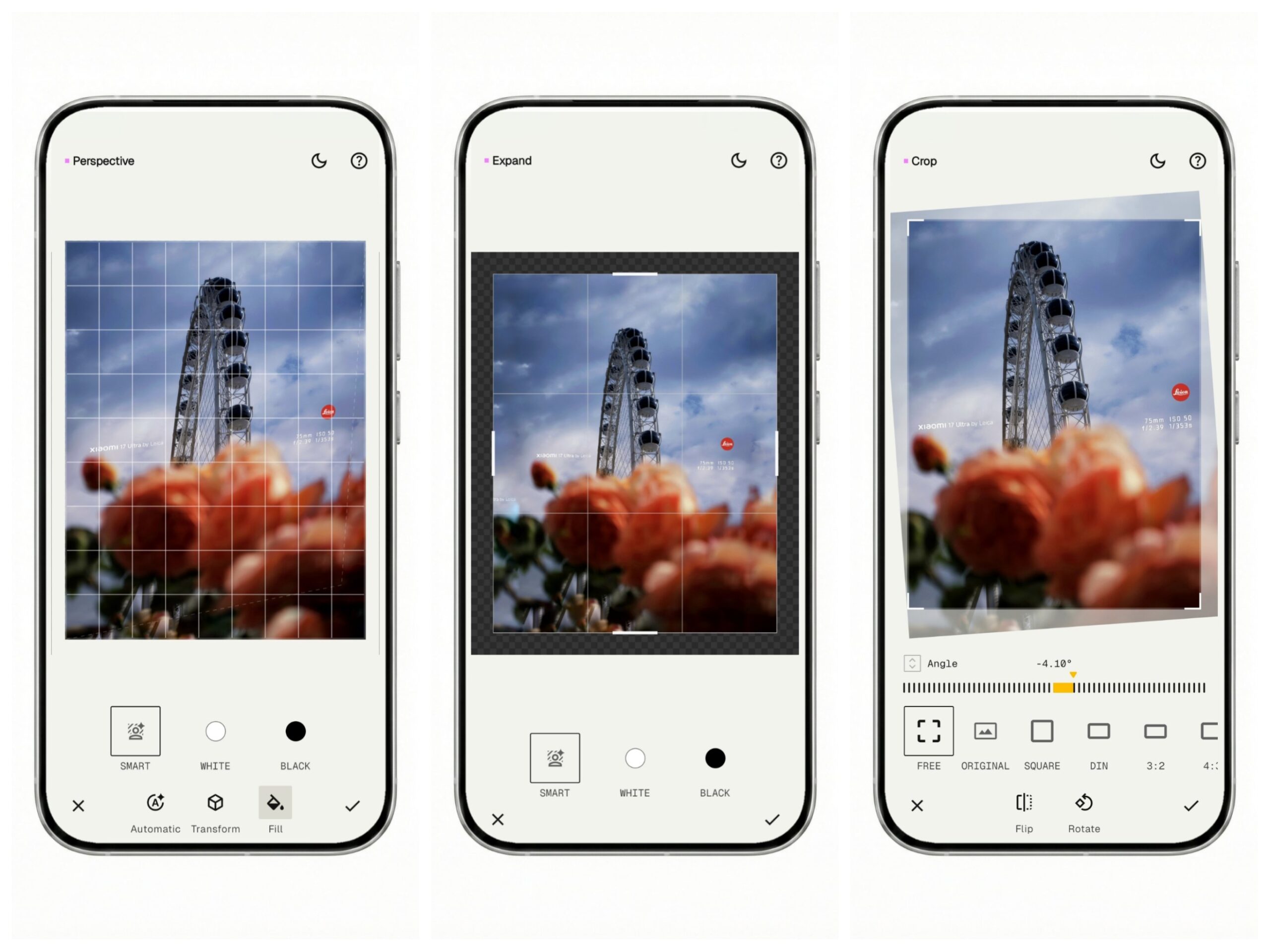
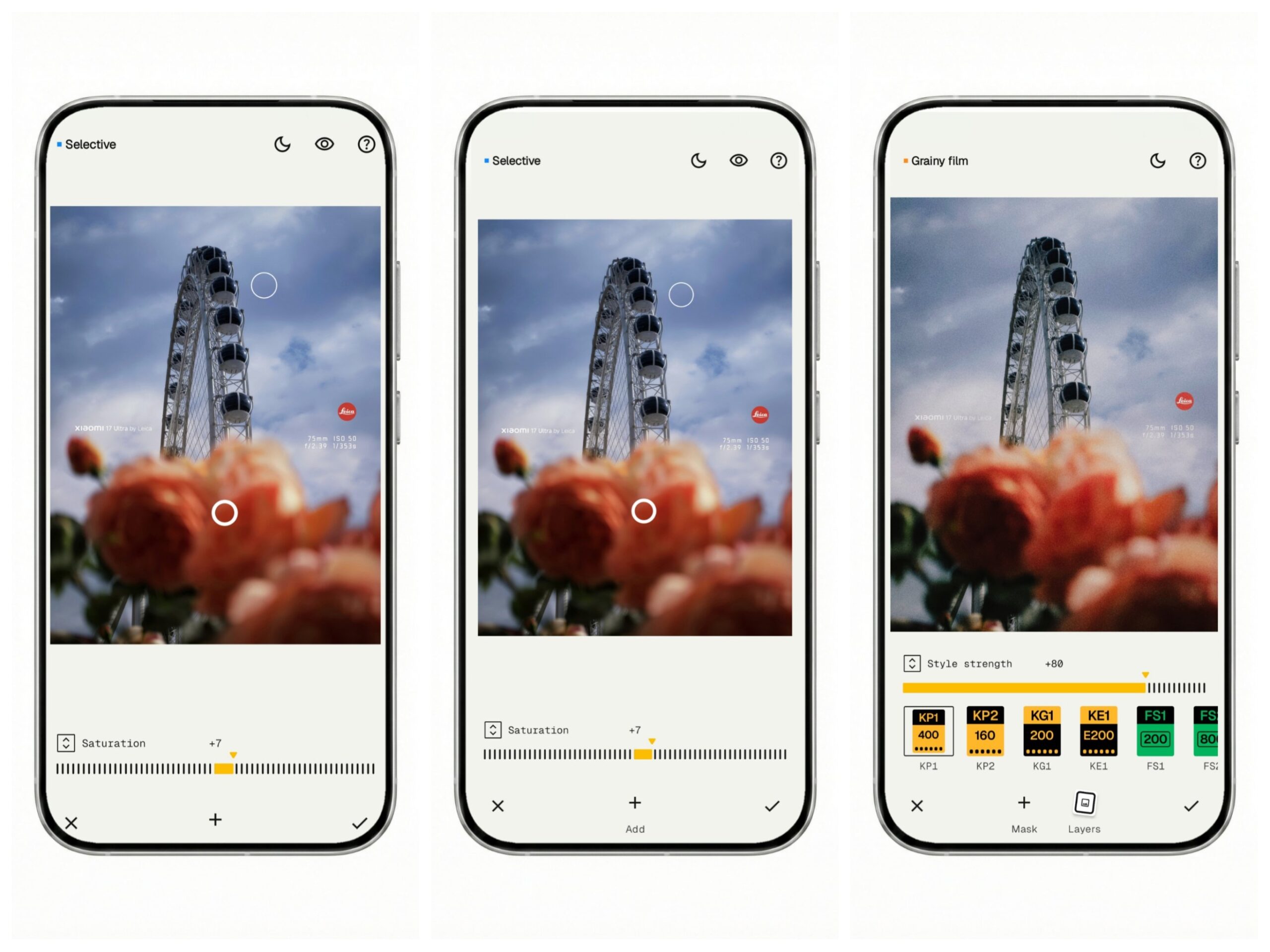
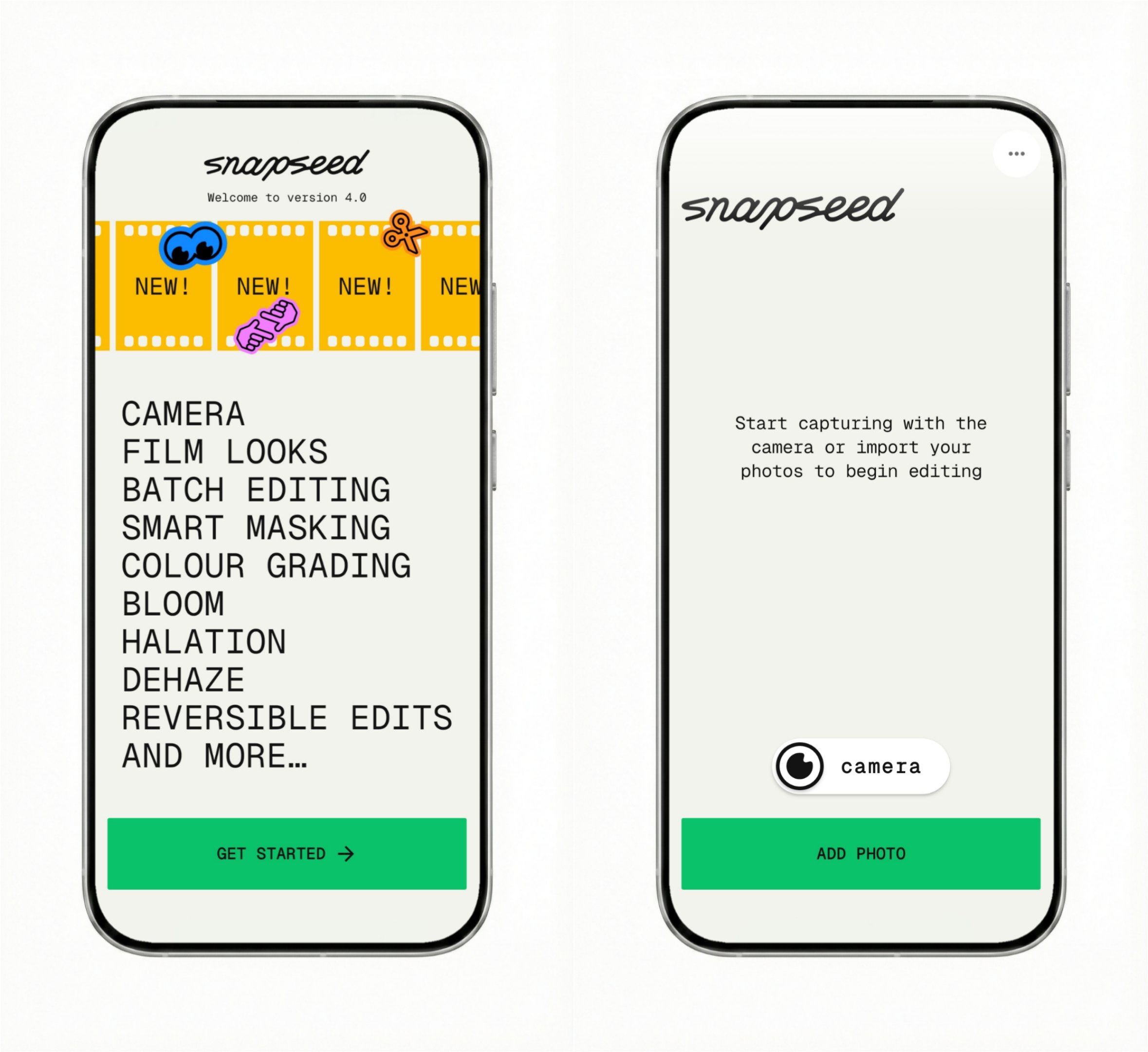
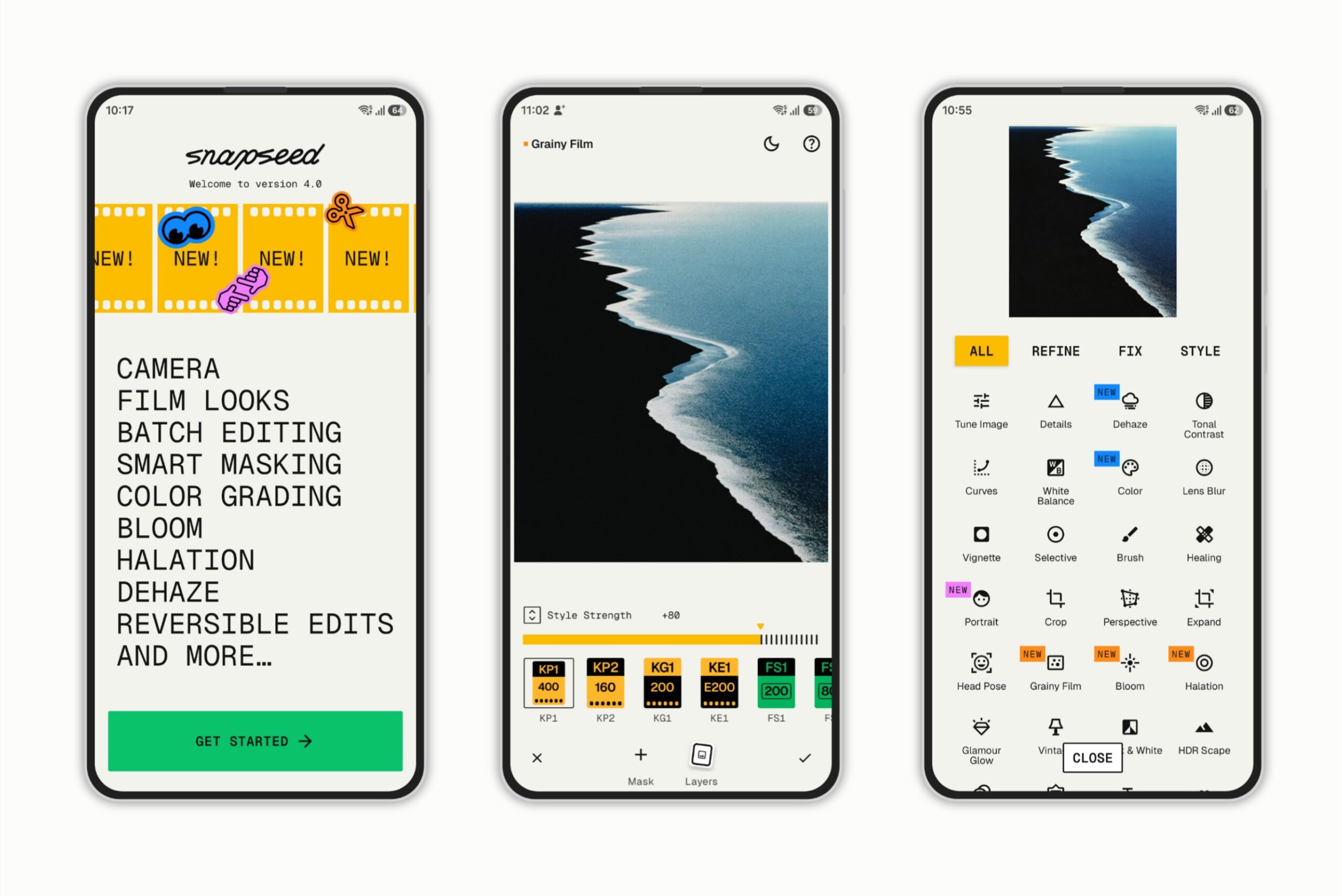
Google has rolled out a monumental platform overhaul with the global release of Snapseed 4.0. Moving users in a massive leap from the legacy 2.22 framework straight into a modernized editing ecosystem, Snapseed 4.0 introduces a complete visual redesign, advanced cinematic filtration tools, non-destructive layer management, and native AI-driven background masking. The app icon remains untouched, serving as a familiar anchor on user home screens, but launching the application immediately reveals a highly optimized editing environment designed to transition power users from ad-hoc adjustments to systematic project management.
Also read about New Workspace logos and icons
When was the new Snapseed 4.0 interface update officially released?
The long-awaited visual and technical rollout commenced globally on May 8, 2026, rolling out via the Google Play Store in distinct regional phases to achieve parity with structural updates previously tested in limited configurations. To solidify the platform’s focus on instantaneous media capture, Google quickly followed the primary release with patch v4.0.1 on May 13, 2026.
This immediate sub-update introduced a dedicated “Camera” homescreen shortcut accessible via a long press on the application icon. The launcher shortcut utilizes the exact same stylized, googly-eye visual motif found inside the application’s floating action button, giving users a direct, single-tap pipeline into the application’s newly integrated real-time shooting environment.
How does the new grid-based library reshape the Snapseed user workflow?
Historically, Snapseed operated on a strict “one-and-done” operational model. A user opened a single file from their camera roll, executed localized adjustments, exported the image, and the application immediately cleared the cache, effectively forgetting the editing session. The new interface completely discards this legacy baseline.
[Legacy UI: Blank Start Screen] ➔ [Snapseed 4.0: Continuous Project Management Grid]
Upon launching the updated platform, users are now greeted by a highly organized, grid-based Project Library screen. This main hub displays high-definition thumbnails of previously edited images and ongoing creative projects. Instead of hunting through device storage to revise a past configuration, photographers can tap an existing tile within the grid to immediately jump back into the active layer stack. For new content acquisition, a prominent, centralized “ADD PHOTO” button or floating action panel allows users to pull raw or compressed files seamlessly from the device’s internal storage tiers.
What are the new tools and tabs inside the Snapseed 4.0 categorized menu?
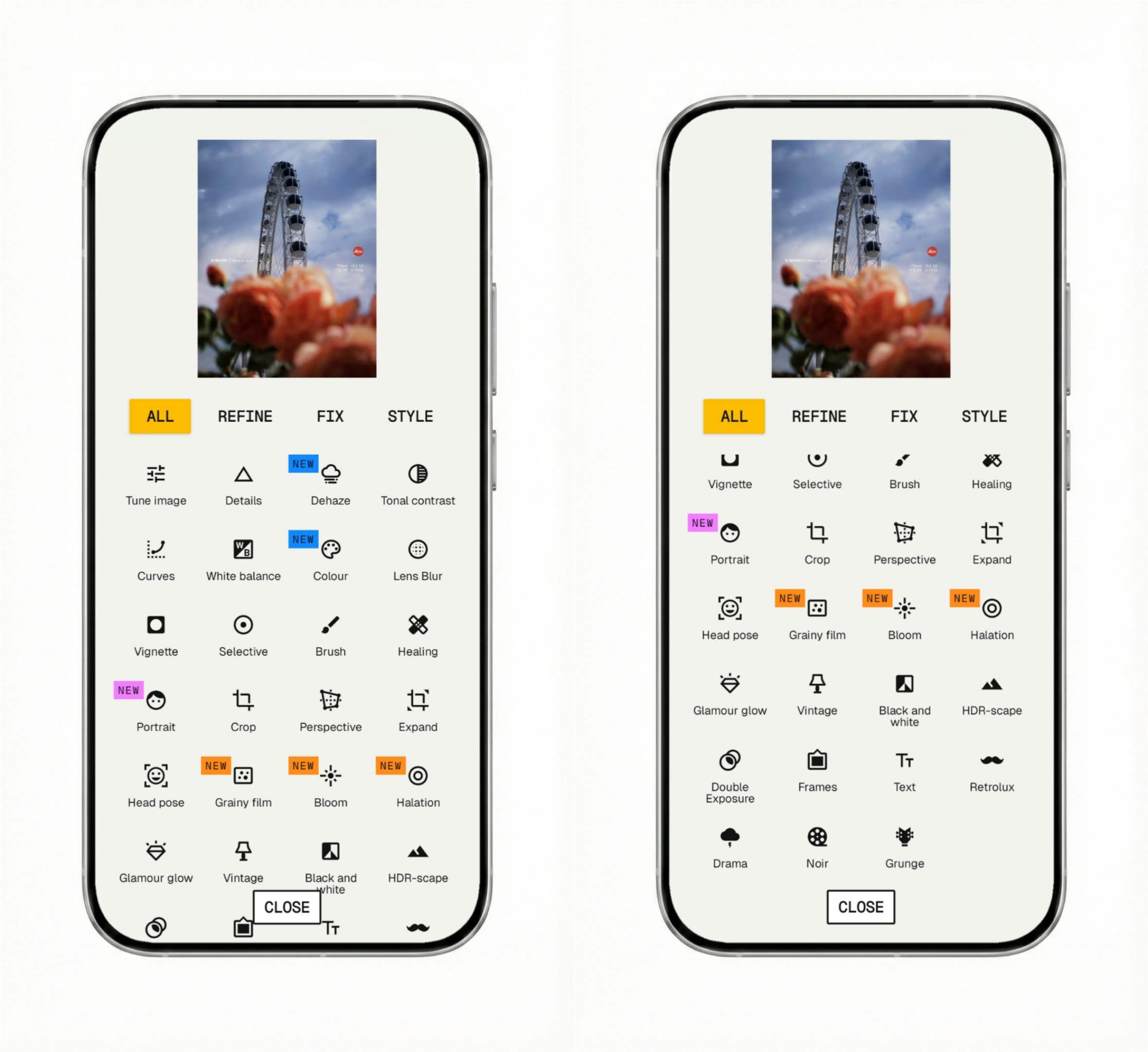
The older user interface was notorious for its expansive, unstructured vertical menu that dumped all technical utilities and creative presets into a single, confusing grid. Snapseed 4.0 resolves this navigation bottleneck by introducing a clean, card-style overlay that splits the app’s editing core into four logical, highly efficient tabs:
- ALL: Houses the full, unbridled catalog of editing tools for macro and microscopic image manipulation.
- REFINE: Groups foundational, technical optimization controls including Tune Image, Details, Curves, and White Balance.
- FIX: Organizes defensive and constructive restorative tools such as Crop, Perspective, Expand, and the heavily optimized Healing brush.
- STYLE: Dedicated exclusively to creative analog presets, vintage emulations, and advanced cinematic grain matrices.
Beyond layout restructuring, Google has utilized this update to deploy a powerful series of highly requested, cinematic editing utilities. Several tools are marked with distinctive purple “NEW” visual tags inside the expanded tools panel, highlighting their entry into the platform:
- Bloom: Inspired by vintage haze filters, this tool expands highlights into a soft, dreamlike, ethereal glow. Users can fine-tune the output using Strength to control intensity, Size to manage the radius of the haze spread, and Range to dictate precisely which tonal values catch the light.
- Halation: This highly advanced tool meticulously recreates the iconic red-orange fringe artifacts commonly found in classic analog film stocks where light reflects directly off the physical film base. It provides a threshold adjustment slider to pinpoint bright light sources and a strength modifier to dial in authentic saturation.
- Dehaze: An algorithm-backed technical filter built to cut through atmospheric haze, fog, smog, or low-contrast lens flare, instantly restoring raw contrast, structural detail, and accurate color saturation to outdoor landscapes.
- Portrait & Colour HSL: The Portrait framework has been completely overhauled with individual face detection capabilities, allowing users to apply unique adjustments to multiple subjects in a single frame rather than forcing a uniform profile onto every face. This is joined by true Colour HSL sliders for precise, targeted color-grading separation.
What is the meaning behind the new cartoon rolling eyes loading animation?
One of the most distinct, highly debated interactive design changes in Snapseed 4.0 is the introduction of a prominent asset-loading and rendering graphic animation. When the application is executing high-intensity background calculations—specifically when compiling a Quick Mask or rendering localized adjustments—the screen darkens and displays a giant, stylized cartoon rolling eyes animation loop over a banner that instructs the user to “Brush anywhere to create an auto mask.”
While power users accustomed to the ultra-minimalist, sterile aesthetics of legacy Google utilities have expressed vocal frustration on community subreddits regarding this sudden addition of “freaking cartoon animations,” the design choice serves a practical operational purpose. The looping, spinning pupils provide immediate visual feedback that the application’s multi-threaded processing engine is actively rendering heavy layer parameters rather than hanging or freezing under load. It injects a quirky, distinct personality into an app that previously lacked modern interactive feedback elements.
How do the automated Subject and Background masking layers operate?
Snapseed 4.0 officially bridges the gap with desktop-grade editing programs by introducing native, one-tap Smart Masking controls. When users enter deeper adjustment modules like Tune Image, the application surfaces a dedicated Layers management drawer. At the baseline of this menu, two automated selection engines are exposed: SUBJECT and BACKGROUND.
By tapping either button, the application instantly executes localized edge-detection algorithms to isolate the primary foreground subject from its environmental background. Once the auto-mask is generated, users can apply granular modifications—adjusting Brightness, Contrast, Saturation, Ambiance, Highlights, Shadows, or Warmth—exclusively to the isolated section without bleeding pixels into the rest of the file. The entire layer structure is entirely non-destructive, meaning masks can be added, subtracted, or re-calibrated at any stage of the production pipeline.
How does the new Snapseed 4.0 save and export logic prevent data loss?
To match its new non-destructive, multi-session workflow, Google has completely overhauled its file output engine, introducing an explicit, three-tier saving architecture designed to prevent accidental flattening of project layers:
| Output Menu Option | Underlying Technical Mechanism | Practical Use Case Selection |
| Save | Rewrites the file parameters inside the Snapseed Project Library, keeping all editing steps and historical masks completely open and reversible. | Ongoing projects requiring future multi-session modifications. |
| Save a copy | Creates a duplicate asset file on the device’s storage layer while leaving the original source image completely untouched, preserving editable layers. | Creating alternative color grades or variations of a single base image. |
| Export | Bakes all historical layer adjustments, custom masks, and cinematic grain elements permanently into a single, flattened image file. | Final deployment for web, printing, social media distribution, or direct sharing. |
Under the application’s advanced settings dashboard, users can further manage output parameters. This includes capping image sizing limits (with a Do not resize option), altering file compression ratios up to JPG 95%, and managing privacy metadata to ensure there are No changes to the exported EXIF information during transmission.
Why is Snapseed 4.0 superior to the native editing tools inside Google Photos?
While the native editor integrated inside the standard Google Photos application has received continuous minor additions, it remains a fundamentally consumer-oriented utility focused on automated enhancements and basic corrections. Snapseed 4.0, conversely, operates as a comprehensive, standalone production platform built for power users who demand total control over their files.
Google Photos relies heavily on automated cloud intelligence—such as Magic Eraser or Portrait Blur—and locks a vast percentage of its best capabilities behind a premium, recurring Google One subscription wall. Snapseed 4.0 remains completely free of charge, offering full access to professional-grade tools like manual Curves, localized Brush cloning, geometric Perspective correction, and custom HSL color grading without monthly fees.
Furthermore, Google Photos completely flattens or destroys editing histories upon saving a file, forcing a linear workflow. Snapseed’s new multi-session Project Library and non-destructive layer mapping allow photographers to go back and adjust a specific edit made ten steps ago without affecting subsequent adjustments. For mobile photographers looking to capture film simulations in real-time or construct complex, multi-layered selections on the move, Snapseed 4.0 stands as an unmatched powerhouse that leaves native gallery editors looking entirely obsolete.